{"maintainers":[{"name":"anonymous","email":"jonathandanielmiles@gmail.com"}],"keywords":["twitter","bootstrap","tree","treeview","tree-view","navigation","javascript","jquery","jquery-plugin"],"dist-tags":{"latest":"1.2.0"},"author":{"name":"Jonathan Miles"},"description":"Tree View for Twitter Bootstrap","readme":"# Bootstrap Tree View\n\n---\n\n\n[](https://www.npmjs.com/package/bootstrap-treeview)\n[](https://travis-ci.org/jonmiles/bootstrap-treeview)\n\nA simple and elegant solution to displaying hierarchical tree structures (i.e. a Tree View) while leveraging the best that Twitter Bootstrap has to offer.\n\n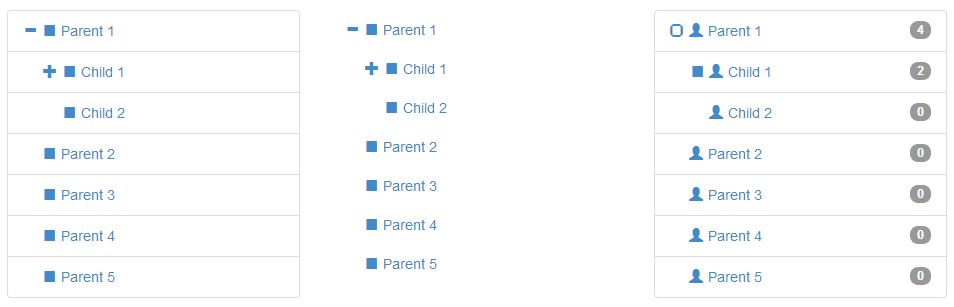\n\n## Dependencies\n\nWhere provided these are the actual versions bootstrap-treeview has been tested against. \n\n- [Bootstrap v3.3.4 (>= 3.0.0)](http://getbootstrap.com/)\n- [jQuery v2.1.3 (>= 1.9.0)](http://jquery.com/)\n\n\n## Getting Started\n\n### Install\n\nYou can install using bower (recommended):\n\n```javascript\n$ bower install bootstrap-treeview\n```\n\nor using npm:\n\n```javascript\n$ npm install bootstrap-treeview\n```\n\nor [download](https://github.com/jonmiles/bootstrap-treeview/releases/tag/v1.2.0) manually.\n\n\n\n### Usage\n\nAdd the following resources for the bootstrap-treeview to function correctly.\n\n```html\n\n\n\n\n\n\n```\n\nThe component will bind to any existing DOM element.\n\n```html\n\n```\n\nBasic usage may look something like this.\n\n```javascript\nfunction getTree() {\n // Some logic to retrieve, or generate tree structure\n return data;\n}\n\n$('#tree').treeview({data: getTree()});\n```\n\n\n## Data Structure\n\nIn order to define the hierarchical structure needed for the tree it's necessary to provide a nested array of JavaScript objects.\n\nExample\n\n```javascript\nvar tree = [\n {\n text: \"Parent 1\",\n nodes: [\n {\n text: \"Child 1\",\n nodes: [\n {\n text: \"Grandchild 1\"\n },\n {\n text: \"Grandchild 2\"\n }\n ]\n },\n {\n text: \"Child 2\"\n }\n ]\n },\n {\n text: \"Parent 2\"\n },\n {\n text: \"Parent 3\"\n },\n {\n text: \"Parent 4\"\n },\n {\n text: \"Parent 5\"\n }\n];\n```\n\nAt the lowest level a tree node is a represented as a simple JavaScript object. This one required property `text` will build you a tree.\n\n```javascript\n{\n text: \"Node 1\"\n}\n```\n\nIf you want to do more, here's the full node specification\n\n```javascript\n{\n text: \"Node 1\",\n icon: \"glyphicon glyphicon-stop\",\n selectedIcon: \"glyphicon glyphicon-stop\",\n color: \"#000000\",\n backColor: \"#FFFFFF\",\n href: \"#node-1\",\n selectable: true,\n state: {\n checked: true,\n disabled: true,\n expanded: true,\n selected: true\n },\n tags: ['available'],\n nodes: [\n {},\n ...\n ]\n}\n```\n\n### Node Properties\n\nThe following properties are defined to allow node level overrides, such as node specific icons, colours and tags.\n\n#### text\n`String` `Mandatory`\n\nThe text value displayed for a given tree node, typically to the right of the nodes icon.\n\n#### icon\n`String` `Optional`\n\nThe icon displayed on a given node, typically to the left of the text.\n\nFor simplicity we directly leverage [Bootstraps Glyphicons support](http://getbootstrap.com/components/#glyphicons) and as such you should provide both the base class and individual icon class separated by a space. \n\nBy providing the base class you retain full control over the icons used. If you want to use your own then just add your class to this icon field.\n\n#### selectedIcon\n`String` `Optional`\n\nThe icon displayed on a given node when selected, typically to the left of the text.\n\n#### color\n`String` `Optional`\n\nThe foreground color used on a given node, overrides global color option.\n\n#### backColor\n`String` `Optional`\n\nThe background color used on a given node, overrides global color option.\n\n#### href\n`String` `Optional`\n\nUsed in conjunction with global enableLinks option to specify anchor tag URL on a given node.\n\n#### selectable\n`Boolean` `Default: true`\n\nWhether or not a node is selectable in the tree. False indicates the node should act as an expansion heading and will not fire selection events.\n\n#### state\n`Object` `Optional`\nDescribes a node's initial state.\n\n#### state.checked\n`Boolean` `Default: false`\n\nWhether or not a node is checked, represented by a checkbox style glyphicon.\n\n#### state.disabled\n`Boolean` `Default: false`\n\nWhether or not a node is disabled (not selectable, expandable or checkable).\n\n#### state.expanded\n`Boolean` `Default: false`\n\nWhether or not a node is expanded i.e. open. Takes precedence over global option levels.\n\n#### state.selected\n`Boolean` `Default: false`\n\nWhether or not a node is selected.\n\n#### tags\n`Array of Strings` `Optional`\n\nUsed in conjunction with global showTags option to add additional information to the right of each node; using [Bootstrap Badges](http://getbootstrap.com/components/#badges)\n\n### Extendible\n\nYou can extend the node object by adding any number of additional key value pairs that you require for your application. Remember this is the object which will be passed around during selection events.\n\n\n\n## Options\n\nOptions allow you to customise the treeview's default appearance and behaviour. They are passed to the plugin on initialization, as an object.\n\n```javascript\n// Example: initializing the treeview\n// expanded to 5 levels\n// with a background color of green\n$('#tree').treeview({\n data: data, // data is not optional\n levels: 5,\n backColor: 'green'\n});\n```\nYou can pass a new options object to the treeview at any time but this will have the effect of re-initializing the treeview.\n\n### List of Options\n\nThe following is a list of all available options.\n\n#### data\nArray of Objects. No default, expects data\n\nThis is the core data to be displayed by the tree view.\n\n#### backColor\nString, [any legal color value](http://www.w3schools.com/cssref/css_colors_legal.asp). Default: inherits from Bootstrap.css.\n\nSets the default background color used by all nodes, except when overridden on a per node basis in data.\n\n#### borderColor\nString, [any legal color value](http://www.w3schools.com/cssref/css_colors_legal.asp). Default: inherits from Bootstrap.css.\n\nSets the border color for the component; set showBorder to false if you don't want a visible border.\n\n#### checkedIcon\nString, class names(s). Default: \"glyphicon glyphicon-check\" as defined by [Bootstrap Glyphicons](http://getbootstrap.com/components/#glyphicons)\n\nSets the icon to be as a checked checkbox, used in conjunction with showCheckbox.\n\n#### collapseIcon\nString, class name(s). Default: \"glyphicon glyphicon-minus\" as defined by [Bootstrap Glyphicons](http://getbootstrap.com/components/#glyphicons)\n\nSets the icon to be used on a collapsible tree node.\n\n#### color\nString, [any legal color value](http://www.w3schools.com/cssref/css_colors_legal.asp). Default: inherits from Bootstrap.css.\n\nSets the default foreground color used by all nodes, except when overridden on a per node basis in data.\n\n#### emptyIcon\nString, class name(s). Default: \"glyphicon\" as defined by [Bootstrap Glyphicons](http://getbootstrap.com/components/#glyphicons)\n\nSets the icon to be used on a tree node with no child nodes.\n\n#### enableLinks\nBoolean. Default: false\n\nWhether or not to present node text as a hyperlink. The href value of which must be provided in the data structure on a per node basis.\n\n#### expandIcon\nString, class name(s). Default: \"glyphicon glyphicon-plus\" as defined by [Bootstrap Glyphicons](http://getbootstrap.com/components/#glyphicons)\n\nSets the icon to be used on an expandable tree node.\n\n#### highlightSearchResults\nBoolean. Default: true\n\nWhether or not to highlight search results.\n\n#### highlightSelected\nBoolean. Default: true\n\nWhether or not to highlight the selected node.\n\n#### levels\nInteger. Default: 2\n\nSets the number of hierarchical levels deep the tree will be expanded to by default.\n\n#### multiSelect\nBoolean. Default: false\n\nWhether or not multiple nodes can be selected at the same time.\n\n#### nodeIcon\nString, class name(s). Default: \"glyphicon glyphicon-stop\" as defined by [Bootstrap Glyphicons](http://getbootstrap.com/components/#glyphicons)\n\nSets the default icon to be used on all nodes, except when overridden on a per node basis in data.\n\n#### onhoverColor\nString, [any legal color value](http://www.w3schools.com/cssref/css_colors_legal.asp). Default: '#F5F5F5'.\n\nSets the default background color activated when the users cursor hovers over a node.\n\n#### selectedIcon\nString, class name(s). Default: \"glyphicon glyphicon-stop\" as defined by [Bootstrap Glyphicons](http://getbootstrap.com/components/#glyphicons)\n\nSets the default icon to be used on all selected nodes, except when overridden on a per node basis in data.\n\n#### searchResultBackColor\nString, [any legal color value](http://www.w3schools.com/cssref/css_colors_legal.asp). Default: undefined, inherits.\n\nSets the background color of the selected node.\n\n#### searchResultColor\nString, [any legal color value](http://www.w3schools.com/cssref/css_colors_legal.asp). Default: '#D9534F'.\n\nSets the foreground color of the selected node.\n\n#### selectedBackColor\nString, [any legal color value](http://www.w3schools.com/cssref/css_colors_legal.asp). Default: '#428bca'.\n\nSets the background color of the selected node.\n\n#### selectedColor\nString, [any legal color value](http://www.w3schools.com/cssref/css_colors_legal.asp). Default: '#FFFFFF'.\n\nSets the foreground color of the selected node.\n\n#### showBorder\nBoolean. Default: true\n\nWhether or not to display a border around nodes.\n\n#### showCheckbox\nBoolean. Default: false\n\nWhether or not to display checkboxes on nodes.\n\n#### showIcon\nBoolean. Default: true\n\nWhether or not to display a nodes icon.\n\n#### showTags\nBoolean. Default: false\n\nWhether or not to display tags to the right of each node. The values of which must be provided in the data structure on a per node basis.\n\n#### uncheckedIcon\nString, class names(s). Default: \"glyphicon glyphicon-unchecked\" as defined by [Bootstrap Glyphicons](http://getbootstrap.com/components/#glyphicons)\n\nSets the icon to be as an unchecked checkbox, used in conjunction with showCheckbox.\n\n\n## Methods\n\nMethods provide a way of interacting with the plugin programmatically. For example, expanding a node is possible via the expandNode method.\n\nYou can invoke methods in one of two ways, using either:\n\n#### 1. The plugin's wrapper\n\nThe plugin's wrapper works as a proxy for accessing the underlying methods.\n\n```javascript\n$('#tree').treeview('methodName', args)\n```\n> Limitation, multiple arguments must be passed as an array of arguments.\n\n#### 2. The treeview directly\n\nYou can get an instance of the treeview using one of the two following methods.\n\n```javascript\n// This special method returns an instance of the treeview.\n$('#tree').treeview(true)\n .methodName(args);\n\n// The instance is also saved in the DOM elements data,\n// and accessible using the plugin's id 'treeview'.\n$('#tree').data('treeview')\n .methodName(args);\n```\n> A better approach, if you plan a lot of interaction.\n\n### List of Methods\n\nThe following is a list of all available methods.\n\n#### checkAll(options)\n\nChecks all tree nodes\n\n```javascript\n$('#tree').treeview('checkAll', { silent: true });\n```\n\nTriggers `nodeChecked` event; pass silent to suppress events.\n\n#### checkNode(node | nodeId, options)\n\nChecks a given tree node, accepts node or nodeId.\n\n```javascript\n$('#tree').treeview('checkNode', [ nodeId, { silent: true } ]);\n```\n\nTriggers `nodeChecked` event; pass silent to suppress events.\n\n#### clearSearch()\n\nClear the tree view of any previous search results e.g. remove their highlighted state.\n\n```javascript\n$('#tree').treeview('clearSearch');\n```\n\nTriggers `searchCleared` event\n\n#### collapseAll(options)\n\nCollapse all tree nodes, collapsing the entire tree.\n\n```javascript\n$('#tree').treeview('collapseAll', { silent: true });\n```\n\nTriggers `nodeCollapsed` event; pass silent to suppress events.\n\n#### collapseNode(node | nodeId, options)\n\nCollapse a given tree node and it's child nodes. If you don't want to collapse the child nodes, pass option `{ ignoreChildren: true }`.\n\n```javascript\n$('#tree').treeview('collapseNode', [ nodeId, { silent: true, ignoreChildren: false } ]);\n```\n\nTriggers `nodeCollapsed` event; pass silent to suppress events.\n\n#### disableAll(options)\n\nDisable all tree nodes\n\n```javascript\n$('#tree').treeview('disableAll', { silent: true });\n```\n\nTriggers `nodeDisabled` event; pass silent to suppress events.\n\n#### disableNode(node | nodeId, options)\n\nDisable a given tree node, accepts node or nodeId.\n\n```javascript\n$('#tree').treeview('disableNode', [ nodeId, { silent: true } ]);\n```\n\nTriggers `nodeDisabled` event; pass silent to suppress events.\n\n#### enableAll(options)\n\nEnable all tree nodes\n\n```javascript\n$('#tree').treeview('enableAll', { silent: true });\n```\n\nTriggers `nodeEnabled` event; pass silent to suppress events.\n\n#### enableNode(node | nodeId, options)\n\nEnable a given tree node, accepts node or nodeId.\n\n```javascript\n$('#tree').treeview('enableNode', [ nodeId, { silent: true } ]);\n```\n\nTriggers `nodeEnabled` event; pass silent to suppress events.\n\n#### expandAll(options)\n\nExpand all tree nodes. Optionally can be expanded to any given number of levels.\n\n```javascript\n$('#tree').treeview('expandAll', { levels: 2, silent: true });\n```\n\nTriggers `nodeExpanded` event; pass silent to suppress events.\n\n#### expandNode(node | nodeId, options)\n\nExpand a given tree node, accepts node or nodeId. Optionally can be expanded to any given number of levels.\n\n```javascript\n$('#tree').treeview('expandNode', [ nodeId, { levels: 2, silent: true } ]);\n```\n\nTriggers `nodeExpanded` event; pass silent to suppress events.\n\n#### getCollapsed()\n\nReturns an array of collapsed nodes e.g. state.expanded = false.\n\n```javascript\n$('#tree').treeview('getCollapsed', nodeId);\n```\n\n#### getDisabled()\n\nReturns an array of disabled nodes e.g. state.disabled = true.\n\n```javascript\n$('#tree').treeview('getDisabled', nodeId);\n```\n\n#### getEnabled()\n\nReturns an array of enabled nodes e.g. state.disabled = false.\n\n```javascript\n$('#tree').treeview('getEnabled', nodeId);\n```\n\n#### getExpanded()\n\nReturns an array of expanded nodes e.g. state.expanded = true.\n\n```javascript\n$('#tree').treeview('getExpanded', nodeId);\n```\n\n#### getNode(nodeId)\n\nReturns a single node object that matches the given node id.\n\n```javascript\n$('#tree').treeview('getNode', nodeId);\n```\n\n#### getParent(node | nodeId)\n\nReturns the parent node of a given node, if valid otherwise returns undefined.\n\n```javascript\n$('#tree').treeview('getParent', node);\n```\n\n#### getSelected()\n\nReturns an array of selected nodes e.g. state.selected = true.\n\n```javascript\n$('#tree').treeview('getSelected', nodeId);\n```\n\n#### getSiblings(node | nodeId)\n\nReturns an array of sibling nodes for a given node, if valid otherwise returns undefined.\n\n```javascript\n$('#tree').treeview('getSiblings', node);\n```\n\n#### getUnselected()\n\nReturns an array of unselected nodes e.g. state.selected = false.\n\n```javascript\n$('#tree').treeview('getUnselected', nodeId);\n```\n\n#### remove()\n\nRemoves the tree view component. Removing attached events, internal attached objects, and added HTML elements.\n\n```javascript\n$('#tree').treeview('remove');\n```\n\n#### revealNode(node | nodeId, options)\n\nReveals a given tree node, expanding the tree from node to root.\n\n```javascript\n$('#tree').treeview('revealNode', [ nodeId, { silent: true } ]);\n```\n\nTriggers `nodeExpanded` event; pass silent to suppress events.\n\n#### search(pattern, options)\n\nSearches the tree view for nodes that match a given string, highlighting them in the tree. \n\nReturns an array of matching nodes.\n\n```javascript\n$('#tree').treeview('search', [ 'Parent', {\n ignoreCase: true, // case insensitive\n exactMatch: false, // like or equals\n revealResults: true, // reveal matching nodes\n}]);\n```\n\nTriggers `searchComplete` event\n\n#### selectNode(node | nodeId, options)\n\nSelects a given tree node, accepts node or nodeId.\n\n```javascript\n$('#tree').treeview('selectNode', [ nodeId, { silent: true } ]);\n```\n\nTriggers `nodeSelected` event; pass silent to suppress events.\n\n#### toggleNodeChecked(node | nodeId, options)\n\nToggles a nodes checked state; checking if unchecked, unchecking if checked.\n\n```javascript\n$('#tree').treeview('toggleNodeChecked', [ nodeId, { silent: true } ]);\n```\n\nTriggers either `nodeChecked` or `nodeUnchecked` event; pass silent to suppress events.\n\n#### toggleNodeDisabled(node | nodeId, options)\n\nToggles a nodes disabled state; disabling if enabled, enabling if disabled.\n\n```javascript\n$('#tree').treeview('toggleNodeDisabled', [ nodeId, { silent: true } ]);\n```\n\nTriggers either `nodeDisabled` or `nodeEnabled` event; pass silent to suppress events.\n\n#### toggleNodeExpanded(node | nodeId, options)\n\nToggles a nodes expanded state; collapsing if expanded, expanding if collapsed.\n\n```javascript\n$('#tree').treeview('toggleNodeExpanded', [ nodeId, { silent: true } ]);\n```\n\nTriggers either `nodeExpanded` or `nodeCollapsed` event; pass silent to suppress events.\n\n#### toggleNodeSelected(node | nodeId, options)\n\nToggles a node selected state; selecting if unselected, unselecting if selected.\n\n```javascript\n$('#tree').treeview('toggleNodeSelected', [ nodeId, { silent: true } ]);\n```\n\nTriggers either `nodeSelected` or `nodeUnselected` event; pass silent to suppress events.\n\n#### uncheckAll(options)\n\nUncheck all tree nodes.\n\n```javascript\n$('#tree').treeview('uncheckAll', { silent: true });\n```\n\nTriggers `nodeUnchecked` event; pass silent to suppress events.\n\n#### uncheckNode(node | nodeId, options)\n\nUncheck a given tree node, accepts node or nodeId.\n\n```javascript\n$('#tree').treeview('uncheckNode', [ nodeId, { silent: true } ]);\n```\n\nTriggers `nodeUnchecked` event; pass silent to suppress events.\n\n#### unselectNode(node | nodeId, options)\n\nUnselects a given tree node, accepts node or nodeId.\n\n```javascript\n$('#tree').treeview('unselectNode', [ nodeId, { silent: true } ]);\n```\n\nTriggers `nodeUnselected` event; pass silent to suppress events.\n\n## Events\n\nEvents are provided so that your application can respond to changes in the treeview's state. For example, if you want to update a display when a node is selected use the `nodeSelected` event.\n\nYou can bind to any event defined below by either using an options callback handler, or the standard jQuery .on method.\n\nExample using options callback handler:\n\n```javascript\n$('#tree').treeview({\n // The naming convention for callback's is to prepend with `on`\n // and capitalize the first letter of the event name\n // e.g. nodeSelected -> onNodeSelected\n onNodeSelected: function(event, data) {\n // Your logic goes here\n });\n```\n\nand using jQuery .on method\n\n```javascript\n$('#tree').on('nodeSelected', function(event, data) {\n // Your logic goes here\n});\n```\n\n### List of Events\n\n`nodeChecked (event, node)` - A node is checked.\n\n`nodeCollapsed (event, node)` - A node is collapsed.\n\n`nodeDisabled (event, node)` - A node is disabled.\n\n`nodeEnabled (event, node)` - A node is enabled.\n\n`nodeExpanded (event, node)` - A node is expanded.\n\n`nodeSelected (event, node)` - A node is selected.\n\n`nodeUnchecked (event, node)` - A node is unchecked.\n\n`nodeUnselected (event, node)` - A node is unselected. \n\n`searchComplete (event, results)` - After a search completes\n\n`searchCleared (event, results)` - After search results are cleared\n\n\n\n## Copyright and Licensing\nCopyright 2013 Jonathan Miles\n\nLicensed under the Apache License, Version 2.0 (the \"License\");\nyou may not use this file except in compliance with the License.\nYou may obtain a copy of the License at \n\nUnless required by applicable law or agreed to in writing, software\ndistributed under the License is distributed on an \"AS IS\" BASIS,\nWITHOUT WARRANTIES OR CONDITIONS OF ANY KIND, either express or implied.\nSee the License for the specific language governing permissions and\nlimitations under the License.\n","repository":{"type":"git","url":"git://github.com/jonmiles/bootstrap-treeview.git"},"users":{"dlaume":true,"phxism":true},"bugs":{"url":"https://github.com/jonmiles/bootstrap-treeview/issues"},"versions":{"1.1.0":{"name":"bootstrap-treeview","description":"Tree View for Twitter Bootstrap","version":"1.1.0","homepage":"https://github.com/jonmiles/bootstrap-treeview","author":{"name":"Jonathan Miles"},"repository":{"type":"git","url":"git://github.com/jonmiles/bootstrap-treeview.git"},"bugs":{"url":"https://github.com/jonmiles/bootstrap-treeview/issues"},"licenses":[{"type":"Apache","url":"https://github.com/jonmiles/bootstrap-treeview/blob/master/LICENSE"}],"main":["dist/bootstrap-treeview.min.js","dist/bootstrap-treeview.min.css"],"scripts":{"install":"bower install","start":"node app","test":"grunt test"},"engines":{"node":">= 0.10.0"},"dependencies":{"express":"3.4.x","ejs":"2.2.x","phantomjs":"1.9.x"},"devDependencies":{"bower":"1.3.x","grunt":"0.4.x","grunt-contrib-uglify":"0.7.x","grunt-contrib-cssmin":"0.12.x","grunt-contrib-qunit":"0.5.x","grunt-contrib-watch":"0.6.x","grunt-contrib-copy":"0.7.x"},"keywords":["twitter","bootstrap","tree","treeview","tree-view","navigation","javascript","jquery","jquery-plugin"],"gitHead":"0c59fb340f2f6f35e921eadacb5482a7ea460edd","_id":"bootstrap-treeview@1.1.0","_shasum":"1bb3dd9c337e56a669c42472e82a303421bd45aa","_from":".","_npmVersion":"2.5.1","_nodeVersion":"0.12.1","_npmUser":{"name":"anonymous","email":"jonathandanielmiles@gmail.com"},"maintainers":[{"name":"anonymous","email":"jonathandanielmiles@gmail.com"}],"dist":{"shasum":"1bb3dd9c337e56a669c42472e82a303421bd45aa","tarball":"http://repository.ncinga.com/nexus/content/groups/npm-all/bootstrap-treeview/-/bootstrap-treeview-1.1.0.tgz","integrity":"sha512-7UZ6aiCaXxgsWlxlwgLStra8L1iqolyisPEM+o9xnGV/AjZqOIr8coMtxrM8m9aDmR869pMcY4ETIC+vwseO0A==","signatures":[{"keyid":"SHA256:jl3bwswu80PjjokCgh0o2w5c2U4LhQAE57gj9cz1kzA","sig":"MEUCIB1VHkVpoYoNdM6Y3C4z6stX6EwSKgssalAjBpmGEXNhAiEA/XL+A+BVxI5WVkcgpyZRcAkxRDxnlykzaR33P7Ii9P0="}]}},"1.2.0":{"name":"bootstrap-treeview","description":"Tree View for Twitter Bootstrap","version":"1.2.0","homepage":"https://github.com/jonmiles/bootstrap-treeview","author":{"name":"Jonathan Miles"},"repository":{"type":"git","url":"git://github.com/jonmiles/bootstrap-treeview.git"},"bugs":{"url":"https://github.com/jonmiles/bootstrap-treeview/issues"},"licenses":[{"type":"Apache","url":"https://github.com/jonmiles/bootstrap-treeview/blob/master/LICENSE"}],"main":["dist/bootstrap-treeview.min.js","dist/bootstrap-treeview.min.css"],"scripts":{"install":"bower install","start":"node app","test":"grunt test"},"engines":{"node":">= 0.10.0"},"dependencies":{"express":"3.4.x","ejs":"2.2.x","phantomjs":"1.9.x"},"devDependencies":{"bower":"1.3.x","grunt":"0.4.x","grunt-contrib-uglify":"0.7.x","grunt-contrib-cssmin":"0.12.x","grunt-contrib-qunit":"0.5.x","grunt-contrib-watch":"0.6.x","grunt-contrib-copy":"0.7.x"},"keywords":["twitter","bootstrap","tree","treeview","tree-view","navigation","javascript","jquery","jquery-plugin"],"gitHead":"542f57eab636e14417216e95fa7f7049bbf3d69f","_id":"bootstrap-treeview@1.2.0","_shasum":"a1bcc81dce784051027a79a8dc9769dc6c8839f4","_from":".","_npmVersion":"2.1.8","_nodeVersion":"0.10.33","_npmUser":{"name":"anonymous","email":"jonathandanielmiles@gmail.com"},"dist":{"shasum":"a1bcc81dce784051027a79a8dc9769dc6c8839f4","tarball":"http://repository.ncinga.com/nexus/content/groups/npm-all/bootstrap-treeview/-/bootstrap-treeview-1.2.0.tgz","integrity":"sha512-NbBNnOCypOYZZAeZ8LK+TVI9HjHExDXOWndbylwNWo8WkxuxuJJOxXbjDewaVkrQhwguE7o/wsRsEfpbGsrNvw==","signatures":[{"keyid":"SHA256:jl3bwswu80PjjokCgh0o2w5c2U4LhQAE57gj9cz1kzA","sig":"MEQCIHzzC0us4nJq9TPLRompW+w2g8HNYJ9+hjZ4Oj/wPm2mAiAmLzOqGEiSSm9Abeh3qZSlEqv2TEm0dOO3bqQn4MLT5g=="}]},"maintainers":[{"name":"anonymous","email":"jonathandanielmiles@gmail.com"}]}},"name":"bootstrap-treeview","time":{"modified":"2022-06-13T04:57:44.972Z","created":"2015-03-30T09:55:27.034Z","1.1.0":"2015-03-30T09:55:27.034Z","1.2.0":"2015-05-09T14:42:28.596Z"},"readmeFilename":"README.md","homepage":"https://github.com/jonmiles/bootstrap-treeview"}